

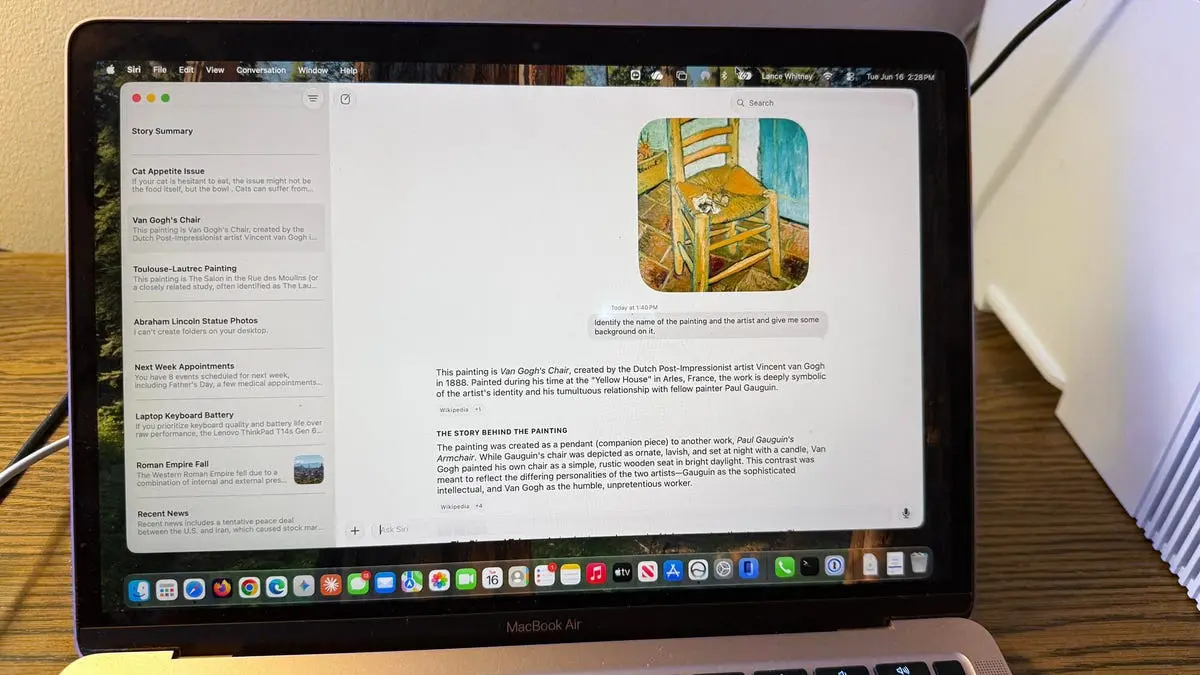
Introduction: Testing the New Siri AI
As a longtime iPhone and Mac user, I've often criticized Siri for its shortcomings. When Apple announced the new Siri AI at WWDC 2026, promising a more conversational and responsive assistant, I was eager to put it through its paces. I used the same tests I apply to ChatGPT and Gemini, comparing their strengths and weaknesses. This report details my experience with the developer beta on a MacBook Air M1, note that availability is limited via waitlist and requires Apple Intelligence-compatible devices.
How to Access Siri AI on MacOS 27
Getting access to Siri AI involves several steps. First, your device must support Apple Intelligence; eligible models include the iPhone 15 Pro, iPad with M-series chips, and Macs with M1 or later. Second, you need to install the developer beta of iOS 27 or MacOS 27, which can be unstable—using a spare device is strongly advised. Finally, you must join a waitlist in the Siri settings, where you'll be notified when the feature becomes available. On my Mac, I received access relatively quickly; on my iPhone, I'm still waiting. Once enabled, you can invoke Siri via voice (“Hey Siri”), the new Siri AI app on the dock, double-pressing the Command key, or right-clicking and selecting “Ask Siri”.
The Testing Methodology
I posed ten scenarios to Siri AI, ranging from general knowledge questions to device-specific tasks. The goal was to assess accuracy, conversational ability, and integration with macOS. I compared its performance to how ChatGPT and Gemini handle similar queries, noting any advantages or shortcomings.
1. General Knowledge: “What's new?”
I started with an open-ended question. Unlike ChatGPT, which often engages in personal chit-chat, Siri AI provided a direct list of current news headlines. It felt more like a digital assistant than a chat buddy, which may be Apple's intended design. The response was concise and useful.
2. Historical Question: “Why did the Roman Empire fall?”
Siri AI delivered a brief explanation with bullet points and cited sources via clickable links. The length and depth were comparable to ChatGPT, but the citation feature is a nice touch for verifying information.
3. Product Recommendation: “What laptop should I buy?”
When I asked for laptop advice with a $2,000 budget and priorities on keyboard and battery life, Siri initially only linked to articles and social media posts without summarizing. After I prompted it to summarize, it gave a helpful opinion. This highlights Siri's need for explicit follow-up instructions.
4. Calendar Integration: “Show me my appointments”
Siri AI correctly pulled up my next week's calendar entries, demonstrating strong integration with local data. This is an area where it outshines cloud-based chatbots.
5. Photo Search: “Find photos of Abraham Lincoln statue”
I asked for photos of a specific subject in my Photos library. Siri found only three out of six matching images. The reason for the discrepancy is unclear, possibly due to metadata or AI vision limitations. This shows room for improvement in local search.
6. Device Control: “Turn on Do Not Disturb”
Siri AI executed the command instantly and correctly toggled the mode, proving its utility for system settings. This is seamless and reliable.
7. File Analysis: Identify a Painting
I uploaded a photo of a Toulouse-Lautrec painting. Siri misidentified both the artist and the title. On a second attempt with another painting, it got the artist right but the title wrong. Only with a Van Gogh piece did it succeed. This indicates limited visual recognition compared to dedicated AI tools.
8. Conversational Advice: Cat feeding tips
When I asked for advice about my cat Mr. Giggles, Siri provided good suggestions and asked a follow-up question about wet or dry food. However, the conversation flow was clunky—I had to manually activate the microphone for each exchange, unlike the fluid back-and-forth of ChatGPT or Gemini.
9. On-Screen Content: Summarize a story
Right-clicking a ZDNET story and choosing “Ask Siri” allowed me to request a summary. The phrasing mattered: “summarize the story on the screen” worked only after saying “summarize the story on the screen” explicitly. Once done, it gave a concise overview of the entire article.
10. Conversation Management: Reviewing past chats
Siri AI saves conversations and syncs across devices. I tested resuming a previous chat about the Toulouse-Lautrec painting and corrected its mistake. It eventually gave the right answer after additional input. The management interface is similar to other AI apps.
Analysis and Comparison
Overall, Siri AI is a clear improvement over the old Siri, but it still lags behind ChatGPT and Gemini in several areas. Accuracy is inconsistent—particularly with visual analysis and local file searches. The conversational experience feels less natural; you have to re-initiate each turn rather than maintaining a continuous thread. On the positive side, system integration (calendar, settings) works flawlessly, and the ability to perform tasks on-device with privacy is a strong selling point.
Apple has heavily invested in AI with Apple Intelligence, and this beta is just the first step. The company has several months to refine Siri AI before the public release expected in September 2025. Competing with established chatbots will require improvements in language understanding, context retention, and accuracy.
For now, Siri AI shows promise as a capable digital assistant for macOS, but power users may still prefer ChatGPT or Gemini for complex queries. The Apple ecosystem integration, however, gives it a unique edge that competitors cannot match. As the beta evolves, we can expect the gap to narrow.
Other notable features include the ability to control more system settings and the potential for future third-party app integration. Apple's approach to AI emphasizes privacy and on-device processing, which could become a major differentiator as data concerns grow. Developers are already exploring ways to leverage Siri AI for productivity, and early feedback suggests that while the features are basic, the foundation is solid.
The waitlist system indicates cautious rollout, allowing Apple to gather feedback and fix bugs. Joining the waitlist on a supported device is straightforward, and once approved, you can immediately start testing. I encourage early adopters to provide feedback to help shape the final product.
Source: ZDNET News