

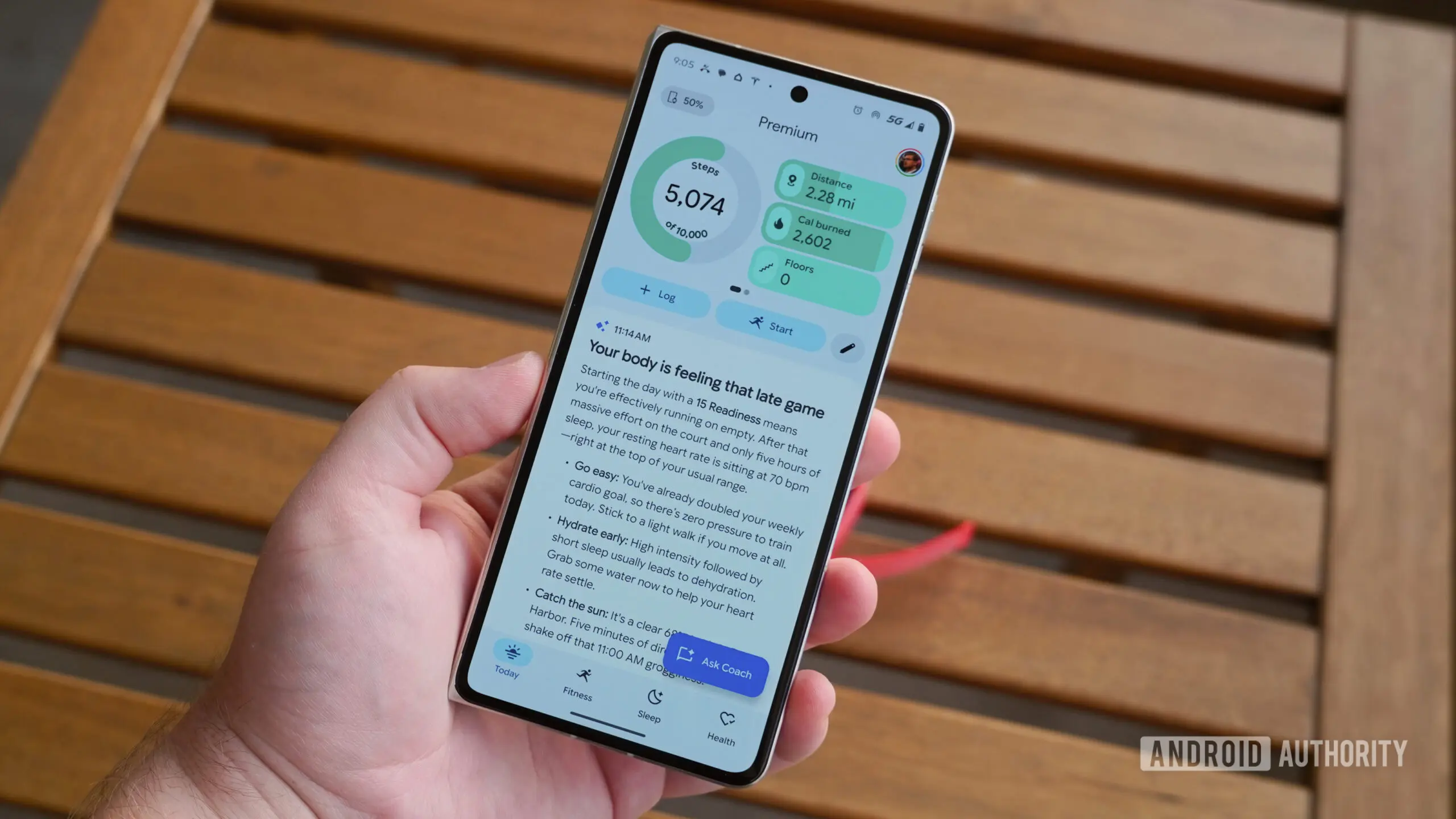
Google Health Premium users who have been frustrated by the prominence of AI-generated guidance in the app's Today tab are getting some relief. The latest update to Google Health introduces a new toggle that removes Health Coach insights from the home screen, giving users a cleaner and more conventional experience. The change is part of version 5.06 of the app, which is now rolling out on both Android and iOS.
Key facts
- Google Health Premium includes AI-driven guidance in the Today tab.
- The latest version of Google Health adds a toggle to turn off Health Coach insights.
- The "No Coach insights" option is available in Coach settings.
- Health Coach remains accessible outside the Today tab.
- Version 5.06 is rolling out on Android and iOS.
What is Google Health Coach?
Google Health Coach is a Gemini-powered conversational assistant integrated into the Google Health app. It is one of the flagship features of Google Health Premium, a subscription tier that offers advanced insights, deeper data analysis, and personalized recommendations. The coach can access data stored in Google Health — such as activity levels, sleep patterns, heart rate measurements, and manual logs — and use that information to answer questions and provide guidance. However, Google has been careful to note that the coach does not offer medical advice, and its recommendations are not intended to replace professional consultation.
Since the launch of Health Coach, many users have appreciated the ability to ask questions and get quick responses based on their health data. But the way the coach presents itself in the app has been a source of friction. By default, the Today tab allocates a large amount of space to Health Coach's insights, explanations, and proactive suggestions. For users who prefer a more traditional dashboard of metrics and trends, this AI-first layout can feel cluttered and intrusive.
The new "No Coach insights" toggle
Version 5.06 of Google Health introduces a dedicated setting called "No Coach insights." When enabled, this option removes Health Coach's verbose guidance and insights from the Today tab. The home screen then becomes more focused on health metrics, rings, trends, and other standard at-a-glance data. Health Coach is not disabled entirely — users can still open the coach through other parts of the app and continue conversations. The toggle only affects the Today tab display, which is a nuanced but important distinction for people who want to keep the assistant available without having it dominate the interface.
The setting can be found by tapping the profile picture in the Google Health app, then navigating to Google Health settings, then Coach. Under Coach settings, users will see the option for "No Coach insights." It is a simple on/off switch, and the change takes effect immediately. This is a significant departure from the previously rigid layout, where Health Coach content was woven into the main feed with no way to dismiss it.
Why Google made this change
The decision to add the toggle is likely a response to user feedback and a growing recognition that AI-generated insights are not always useful or accurate. Early reviews of Health Coach have been mixed. Some users found that the assistant's suggestions were overly generic, while others reported that certain insights seemed logically inconsistent with the data they had logged. In some cases, the coach would recommend things that contradicted established health guidelines, raising concerns about how much trust users should place in automated guidance.
Google has not publicly detailed the reasoning behind the new toggle, but it is clear that the company is making a deliberate effort to address usability concerns. By giving users control over whether AI content appears on the Today tab, Google is acknowledging that not everyone wants a generative AI chatbot to be the centerpiece of a health tracking app. This is especially important for a health-related product, where trust and clarity are critical.
The broader context of AI in health apps
Google Health is not the only health platform experimenting with AI assistants. Many companies are exploring how large language models can be used to interpret health data, offer lifestyle recommendations, and support users in managing chronic conditions. The potential benefits are enormous, but so are the risks. AI can offer personalized insights at scale, but it can also produce inaccurate or even harmful suggestions if not carefully supervised.
Google has taken a cautious approach with Health Coach, including disclaimers that the AI is not providing medical advice. Yet even with those disclaimers, the way AI content is presented in the interface matters. If a user opens the app and sees a large block of AI-generated text before their own health data, they may unconsciously give it more weight than it deserves. Removing these insights from the Today tab can help maintain a clear separation between factual data and AI interpretation.
The new toggle is part of a broader trend toward giving users more control over AI features. In recent months, Google has introduced similar options across other products, allowing users to reduce the prominence of AI-powered summaries, suggestions, and recommendations. This approach reflects an understanding that while AI can be useful, it should not be forced on users who prefer a more traditional experience.
What remains the same for Health Coach
Even with the new toggle enabled, Health Coach remains available for those who want to use it. Users can still access the coach by tapping the dedicated Health Coach tab or by starting a conversation through the app's assistant interface. The coach will still remember previous conversations and can continue to provide answers based on the user's health data. The only difference is that its insights will no longer appear as a default part of the Today tab.
This is a thoughtful compromise. It allows users to opt into the AI experience without having to see it every time they open the app. It also means that Health Coach can still be a useful tool for those who actively seek it out. For example, a user might want to ask the coach about their sleep trends or get suggestions for staying hydrated, but they may not want to read a lengthy AI-generated narrative every morning. The toggle respects both preferences.
How to update Google Health
Version 5.06 of Google Health is rolling out now. Users can update the app through the Play Store on Android or the App Store on iOS. As with most staged rollouts, not all users will see the update immediately. It may take several days or even weeks for the update to become available in every region. Once installed, the new "No Coach insights" toggle will appear under the Coach settings tab.
For those who have not yet tried Health Coach, the toggle may not seem especially relevant. But for existing Premium subscribers who have been overwhelmed by the volume of AI commentary in their feed, it could make a significant difference in how they interact with the app. The change also signals that Google is listening to its users and willing to adjust the product experience based on real-world feedback.
What this means for Google Health Premium
Google Health Premium offers several features in addition to Health Coach, including advanced sleep analysis, mindfulness sessions, and personalized health reports. The subscription tier is designed to provide a more comprehensive health tracking experience than the free version of Google Health. Until now, Health Coach was the most visually prominent element of the Premium experience, often appearing at the top of the Today tab and interweaving with regular health metrics.
With the new toggle, Premium subscribers can curate their home screen more deliberately. This might make the Premium subscription more appealing to users who were previously put off by the overbearing AI presence. It also provides a more balanced experience for those who want both traditional health tracking and optional AI support.
Potential future improvements
While the new toggle is a welcome addition, some users may want even more granular control. For instance, it might be useful to hide specific types of insights while keeping others, such as only seeing actionable suggestions and not long-form explanations. Google could also introduce options to adjust the frequency of Health Coach insights or to schedule them at specific times of day. These kinds of refinements would further tailor the app to individual preferences.
Another area for potential improvement is the accuracy and transparency of Health Coach itself. The coach draws on Google Health data and publicly available guidelines, but it still makes mistakes. Enabling users to provide feedback on specific insights, or to understand the sources behind each recommendation, could build greater trust. The new toggle does not address these underlying challenges, but it does reduce the pressure they place on the core app experience.
As Google continues to iterate on Health Coach, it will be important for the company to maintain this user-first approach. The most successful health apps are those that give users clear control over their data, their interface, and the tools they use to understand their bodies. AI can be a powerful ally in that journey, but it should never feel like an unavoidable presence.
The rollout of version 5.06 is a small step, but one that aligns with a broader philosophy of user agency. By removing AI guidance from the Today tab when requested, Google Health is acknowledging that health tracking is deeply personal. No single layout will work for everyone, and the ability to customize the experience is not just a convenience — it is a necessity in a crowded and ever-evolving app landscape.
Source: Android Authority News